

IBA VPN. A secure connection for your trip
Connect to a VPN at your hotel, at the airport or on the move. Choose a server and control which apps use the tunnel.
- Server selection
- Smart Mode
- Split tunnelling
- Automatic server switching
Main screen
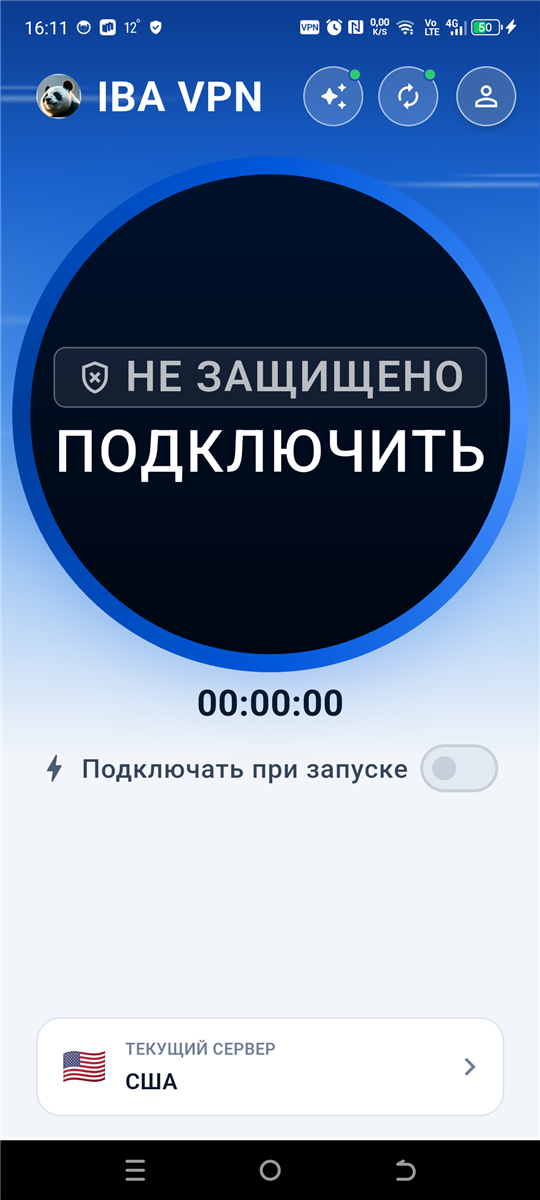
Three steps to connect
- Download the APK from the official website and install IBA VPN.
- Sign in with your email or ID; dealer QR scanning is available on the sign-in screen.
- Select a server, tap connect and approve the Android VPN request.
A VPN needs working Wi-Fi or mobile data and active service access. Subscription terms appear in the app. Availability and speed depend on your network and server.
A VPN encrypts traffic inside the tunnel to the VPN server. Keep checking website addresses, using HTTPS and protecting your accounts: a VPN complements these habits.
Get ready for your trip
- Prepare your phone connection for a trip to ChinaPrepare mobile data, offline information and VPN settings before departure.
- Hotel Wi-Fi safety: a practical checklistVerify the network, sign-in page, HTTPS and VPN status.
- Prepare your phone for airport Wi-FiOffline documents, a screen lock and connection checks.
- VPN and mobile data abroad: what is the difference?Understand your data plan and the role of a VPN.
- How to choose a server in IBA VPNChoose an available server and test your connection.
- Split tunnelling in IBA VPN on AndroidCheck which apps are routed through the VPN tunnel.
- IBA VPN Smart Mode: checks before your tripReview Smart Mode, automatic switching and the connection result.
- Install IBA VPN on Android and connectGet the official APK, sign in and make your first connection.